Z-Image Turbo Prompt Guide: 20 Real Examples for Editorial, Social Visuals, and Style Control
A practical Z-Image Turbo guide with real prompts, bilingual text examples, and repeatable workflows for editorial illustrations, social visuals, seasonal lifestyle scenes, and style control on VibeArt.
March 11, 2026
•By VibeArt Team•
16 min read
•— views
If you have already seen impressive Z-Image Turbo demos, the next question is more useful: what kinds of prompts actually work when you need publishable images?
This guide is built from real generations on VibeArt, using the remaining curated images that did not go into our Z-Image Turbo model card. Instead of repeating benchmark claims, this article focuses on practical prompt patterns you can reuse for editorial illustration, WeChat and blog covers, seasonal lifestyle visuals, style control, and lightweight asset generation.
As of March 11, 2026, the official Hugging Face model card and the official Tongyi-MAI/Z-Image repository position Z-Image Turbo as the fast member of the open-source Z-Image family: a distilled variant built for 8-step generation, strong prompt following, photorealistic quality, and bilingual text rendering. Those facts matter, but workflow matters more. The real question is whether the model can help you get to a useful image faster.
On VibeArt, the answer is often yes.
Quick Answer: What Is Z-Image Turbo Good At?
If you only want the short version, Z-Image Turbo works especially well for:
editorial illustrations with a clear visual metaphor
social visuals that need to read at thumbnail size
calm lifestyle or seasonal imagery with simple composition
style tests where you want to swap visual language without rewriting the entire prompt
isometric assets and small product-like scenes
It is less ideal when you need:
maximum luxury-detail product rendering
long, heavily constrained text layouts
deeper fine-tuning or high-diversity exploration
That tradeoff is consistent with the official positioning of the Z-Image family: Turbo favors speed and strong first-pass usability, while the base Z-Image model is designed for richer diversity and more tunable generation.
Why Use Z-Image Turbo on VibeArt
Using Z-Image Turbo inside VibeArt changes the workflow in a practical way. You are not generating a single image in isolation and then losing the context of your iterations. You can keep multiple attempts on the same canvas, compare directions visually, branch prompts, and decide what to refine without throwing earlier work away.
That makes Turbo more valuable than its pricing or speed alone suggests. A fast model becomes much more useful when the workspace around it supports comparison and accumulation.
If you want the formal landing page, specs, and structured overview, start with the . This article is the hands-on companion: prompt structure, real outputs, and repeatable patterns.
The official base-model page on Hugging Face includes a direct Z-Image vs Z-Image-Turbo comparison. Paraphrased into creator language, the split looks like this:
Aspect
Z-Image
Z-Image-Turbo
What it means in practice
Generation steps
28-50
8
Turbo is the faster working model
CFG / negative prompting
Supported
Not supported
Base model is more tunable for advanced control
Diversity
Higher
Lower
Base model is better if you want wider exploration
Fine-tuning friendliness
Better
Limited
Turbo is more for direct use than custom adaptation
Official positioning
Foundation model
Distilled fast variant
Turbo is better for quick publishing loops
That is why this guide focuses on high-clarity, high-utility prompts rather than hyper-technical control tricks. Turbo is strongest when your prompt tells it exactly what kind of image it is making, what the main subject is, what the composition should emphasize, and what should stay out of frame.
A Prompt Formula That Works
Across the strongest remaining Z-Image Turbo outputs in our archive, one pattern shows up repeatedly:
Name the image type.
Define the subject clearly.
Specify the composition.
Lock the mood, palette, or material cues.
Add production constraints.
A reliable template looks like this:
[image type], [subject], [composition], [style or mood], [palette or material cues], [quality constraints], [negative constraints]
For example:
Chinese editorial illustration style, an AI workflow desk with multiple drafts on the left and a human editor selecting and rewriting on the right, isometric composition, teal and warm orange palette, modern tech atmosphere, sharp details, absolutely no text
This works because it narrows ambiguity quickly. Z-Image Turbo usually performs better when the prompt behaves like a creative brief, not a loose idea.
A Fresh Official-Capability Canvas And The Prompts Worth Reusing
The examples above come from practical workflow images. To make this article more useful for readers who are coming from the official model card, I also opened a fresh VibeArt canvas and generated a second batch aimed directly at the capabilities the official materials emphasize most:
photorealistic quality
bilingual text rendering
reasoning / prompt understanding
instruction adherence
That matters because it shows two different truths about Z-Image Turbo at once. It is not only a working model for editorial and content teams. It can also produce highly usable official-style proof shots when you prompt it in the language the model card itself suggests.
1. Photorealistic portrait with layered instructions
What makes this image useful is not just that it looks polished. The prompt asked for multiple things to remain coherent at once: red Hanfu, ornate hair ornaments, a round fan, a specific forehead pattern, a pagoda night background, and a glowing lightning symbol balanced in the hand. That makes it a stronger instruction-following example than a generic beauty portrait.
Prompt:
Young Chinese woman in red Hanfu, intricate embroidery. Impeccable makeup, red floral forehead pattern. Elaborate high bun, golden phoenix headdress, red flowers, beads. Holds round folding fan with lady, trees, bird. Neon lightning-bolt lamp, bright yellow glow, floating above extended left palm. Soft-lit outdoor night background, silhouetted tiered pagoda in Xi'an, blurred colorful distant lights. Photorealistic, cinematic, ultra-detailed.
2. Bilingual text rendering: poster, packaging, signage
If you only took one claim from the official Z-Image Turbo material and wanted to test it directly, bilingual text rendering would be the obvious choice. In practice, the model seems most convincing when the text is kept short and attached to a believable commercial format:
a poster
a product package
storefront signage
2.1 Bilingual skincare poster
This is a good proof that Z-Image Turbo can place short bilingual copy into a product poster while still keeping the frame believable as an ad. The layout is not perfect, but it is good enough to show that short bilingual campaign text is a real strength, not just a claim in the model card.
Prompt:
Luxury skincare poster. Frosted glass serum bottle on a cream stone pedestal, soft gold rim light, premium beauty campaign composition, highly realistic product photography. The poster contains exactly four readable text elements only: Chinese "晨光精华", English "Morning Serum", Chinese "轻盈修护", English "Light Repair". Elegant high-end typography, balanced spacing, no extra words, no logo, no watermark.
2.2 Bilingual packaging
This is one of the strongest text examples from the canvas. The text is not floating awkwardly above the object. It sits on the package face like real label copy, and the overall result still feels like a believable product photograph.
Prompt:
Photorealistic premium coffee bag packaging on a neutral warm-gray studio background, matte paper bag, subtle valve, realistic shadows. The front label contains only four readable text elements: Chinese "云南咖啡", English "Yunnan Coffee", Chinese "日晒处理", English "Natural Process". Accurate printed typography on the bag surface, no extra text, no logo, high-end packaging photography.
2.3 Bilingual storefront signage
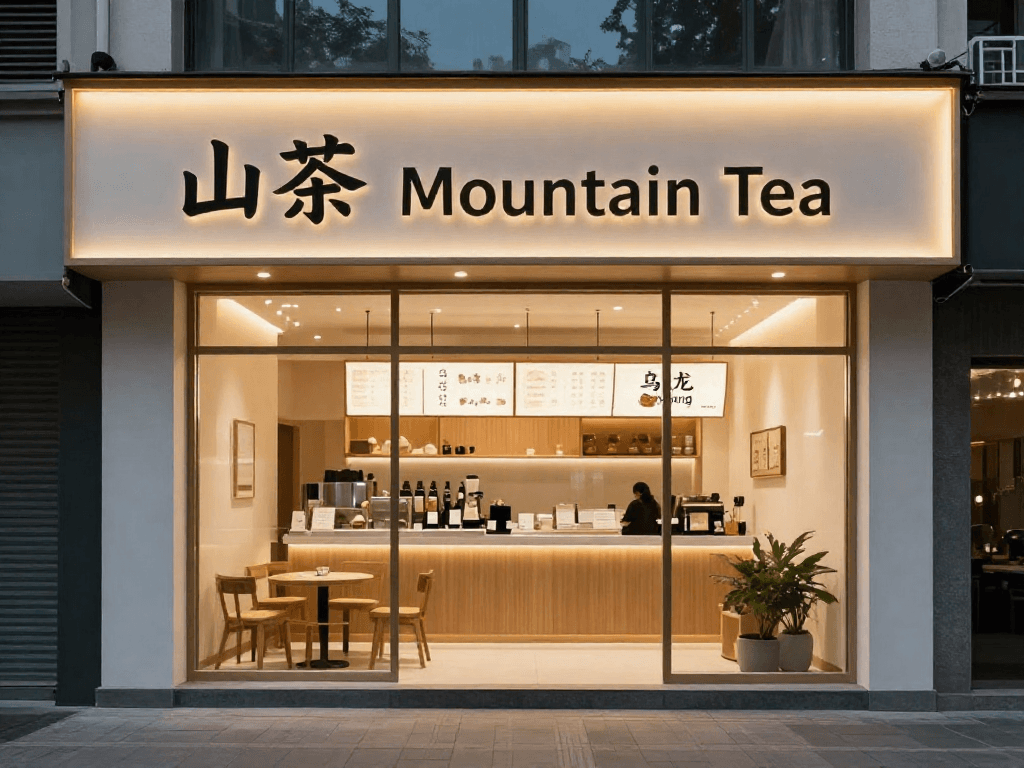
This is the image I would use as the cover for the article because it shows something harder than flat product text: readable bilingual signage in a realistic environment. That makes it especially valuable for search intent around z-image turbo text rendering, z-image turbo bilingual signage, or commercial brand mockups.
Prompt:
Photorealistic modern tea bar storefront at dusk, clean glass facade, warm interior lighting, elegant urban street scene. The storefront signage contains only short readable bilingual text: Chinese "山茶" and English "Mountain Tea". Menu board visible through the window contains only two short readable items: Chinese "乌龙" and English "Oolong". No other text, no logo clutter, premium branding photography.
3. Reasoning and cultural-scene coherence
The official wording around prompt enhancing and reasoning can sound abstract. For creators, a more concrete test is this: can the model arrange a culturally specific scene so the objects feel like they belong together?
3.1 Mid-Autumn Festival still life
This image works because the scene logic feels correct. Mooncakes, tea, rabbit symbolism, round window, moon, and warm lantern light all reinforce the same cultural read instead of competing with each other.
Prompt:
Culturally coherent Mid-Autumn Festival still life in an elegant Chinese home interior: mooncakes on a porcelain plate, a small white tea set, osmanthus blossoms, rabbit paper-cut decoration, warm lantern glow, and a full moon visible through a round window. The arrangement should feel authentic, harmonious, and logically composed, with no random clutter, no text, no watermark. Photorealistic editorial photography.
3.2 Dragon Boat Festival breakfast
This one is quieter than the Mid-Autumn scene, but it is very stable. Zongzi, bamboo leaves, salted duck egg, tea, and morning window light all belong in the same world. That makes it a good proof for culturally coherent prompt understanding.
Prompt:
Culturally coherent Dragon Boat Festival breakfast scene in southern China: freshly unwrapped zongzi on a ceramic plate, bamboo leaves, a small bowl of salted duck egg, a simple tea set, morning window light, and subtle festival details that feel authentic and logically arranged. No random clutter, no text, no watermark. Photorealistic editorial photography.
4. Instruction adherence through explicit object layout
This is one of the cleanest ways to test instruction following because the prompt is easy to audit. The image needs an exact count, clear colors, clear object identities, and clear relative placement. If the model drifts, you can see it instantly.
Prompt:
Top-down studio tabletop on a charcoal surface. Exactly seven objects and nothing else: a blue notebook in the top left, silver fountain pen in the top center, black camera in the top right, green ceramic tea cup in the middle left, white earbuds case in the middle center, red passport in the middle right, and a yellow keychain centered below them. Clean shadows, precise spacing, photorealistic, no text, no logo.
If you want a compact set of reusable official-style templates, these are the four I would keep:
photorealistic subject with many coordinated instructions
short bilingual commercial text
culturally coherent scene logic
exact counting and placement constraints
Prompt Pattern 1: Editorial Explainer Visuals
One of the strongest image pools left after the model card comes from editorial and technology visuals. These are useful because they look like article illustrations, not generic AI wallpapers.
Two patterns stand out:
the image is framed as an editorial illustration or editorial visual
the prompt includes a specific metaphor or conflict, not just a topic
That keeps the output focused on visual argument instead of decorative chaos.
This kind of prompt works because it gives the model a subject, a symbolic split, and a narrow palette. It reads like an article image instead of a random "future tech" scene.
The second example is more literal, but it still works because it is framed as a visual concept with a clear handoff story, not just "a programmer at a computer."
If you want Z-Image Turbo to produce publishable editorial art, use prompt language like:
editorial illustration
editorial visual
cinematic tech editorial style
absolutely no text
That last line is often the difference between a usable article visual and an almost-good one.
Prompt Pattern 2: WeChat Covers and Social Visual Metaphors
The next high-value cluster comes from images that feel tailored for social covers, opinion posts, or WeChat article headers. These prompts are not chasing realism. They are trying to convert an idea into a thumbnail-readable image.
The best prompts in this category usually include:
a split composition or direct contrast
symbolic objects or characters
a palette contrast such as warm vs. cool
a strong focal idea that survives mobile-size viewing
This image works because the metaphor is explicit. The prompt asks for an idea conflict, not just an illustration style.
This is the kind of image that works well for commentary posts, trend explainers, or opinion pieces. The split composition makes it readable before the viewer has processed all the details.
If your use case is "I need a striking cover image for a post, newsletter, or social commentary," Z-Image Turbo is often more useful when you ask for a metaphor than when you ask for a literal scene.
Prompt Pattern 3: Seasonal Lifestyle Visuals
Z-Image Turbo also does better than people expect on calm lifestyle scenes, especially when the prompt is rooted in seasonality, atmosphere, and one clear sensory anchor.
These are not the loudest images in the set, but they may be the most reusable. Content teams publish this kind of image every day: tea by a rainy window, bright seasonal ingredients, a quiet riverside in spring light.
Notice how much mileage comes from one sensory anchor: steam, rain, green leaves, and a calm interior mood.
The prompt does not overcomplicate the scene. It names the ingredients, the setting, the lighting quality, and the cleanliness constraint.
This is a good example of where a simple scene plus a specific mood can outperform a longer cinematic paragraph.
For calm editorial lifestyle prompts, a productive structure is:
[scene], [one sensory anchor], [lighting cue], [editorial or lifestyle photography], [clean composition], [no logo / no watermark / no UI overlay]
This pattern is especially useful for newsletter art, seasonal blog posts, wellness content, and homepage cover visuals.
Prompt Pattern 4: Style Control Without Overcomplication
One remaining cluster is ideal for search intent around style prompts. In this set, the subject stays simple while the visual language changes dramatically. That makes it easier to see what the style words are doing.
The key lesson is that style control does not require a giant cinematic prompt. In many cases, a shorter prompt makes the style shift easier to evaluate.
Watercolor prompts work best when you describe the paint behavior, not just the label "watercolor."
Here the style words carry the frame: bold ink outlines, halftone dots, pop art, action scene.
Pixel-art prompts are usually stronger when you anchor both the era and the texture vocabulary.
If you want to test style range quickly, start with:
[style vocabulary], [lighting or material vocabulary], [subject], [setting]
That is often enough to tell whether the model understands the style direction before you add more composition detail.
Prompt Pattern 5: Isometric Assets and Product-Like Scenes
The final strong bucket from the remaining pool is isometric asset generation. These images matter because they are useful beyond "gallery art." They can support onboarding screens, landing page illustrations, diagrams, or small simulation concepts.
These prompts work because they limit the scope. Instead of asking for a whole world, they ask for one polished object or mini-scene with clear silhouette and material cues.
That gives Z-Image Turbo enough direction to produce something product-friendly instead of noisy.
Same Prompt, Different Model
This article is not mainly a benchmark post, but side-by-side comparisons still help clarify where Z-Image Turbo fits.
Social Avatar Illustration
In this social-avatar style prompt, Z-Image Turbo lands on a cleaner, immediately usable profile look. It is not doing something radically different. It is getting to a usable answer quickly, which is often the more important win for practical design work.
Painterly Street Scene
For painterly prompts, Z-Image Turbo can hold together the large visual read surprisingly well. That does not mean it always beats the slower model on every nuance. It means the first-pass image already has strong shape, color direction, and scene confidence.
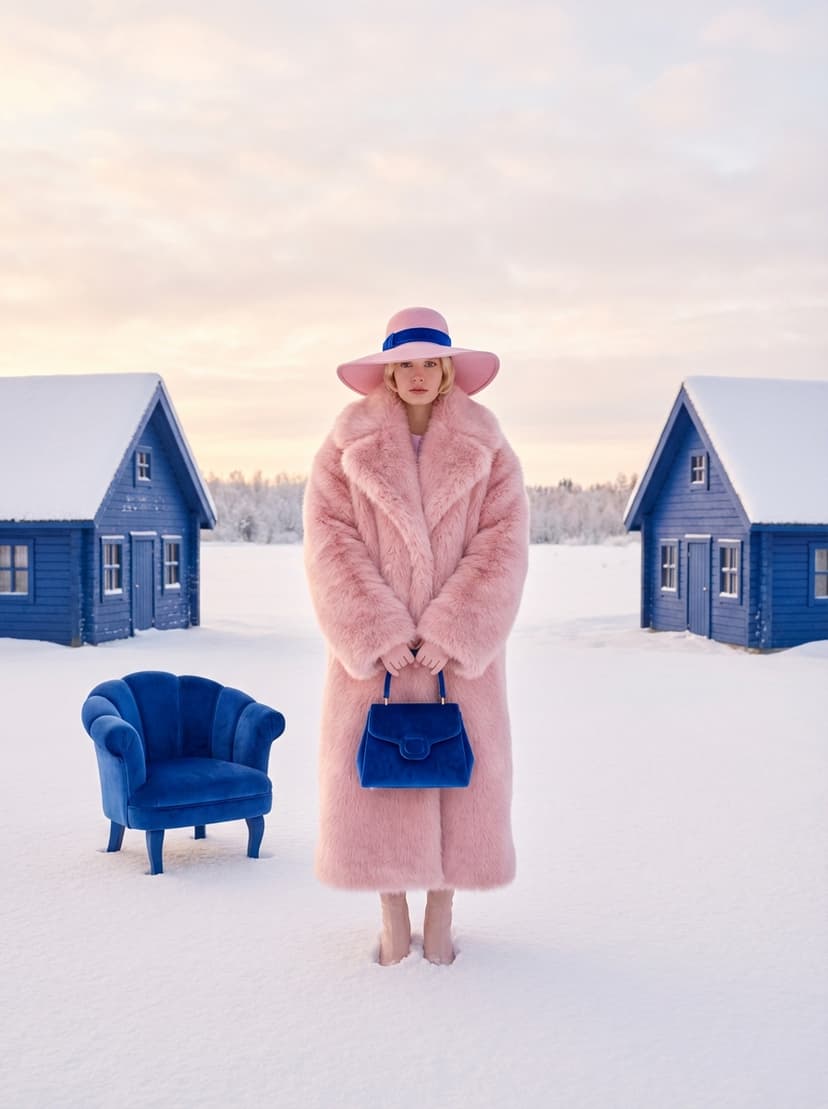
Fashion Editorial Prompt
This is where the tradeoff becomes clearer. Other models may sometimes push realism, gloss, or fabric nuance further. Z-Image Turbo's value is that it often reaches a convincing editorial frame much faster, which matters when you are searching for direction rather than polishing a final campaign image.
Best Z-Image Turbo Use Cases on VibeArt
Based on these real examples, Z-Image Turbo is a strong fit when you need:
article illustrations with a strong metaphor
WeChat cover visuals and social explainers
seasonal or lifestyle editorial scenes
fast style tests with controlled subjects
isometric assets for product storytelling
a quick first-pass image before escalating to a slower model
If your workflow is "generate, compare, refine, publish," Turbo fits naturally.
FAQ
Is Z-Image Turbo good for prompts with text?
The official model card highlights bilingual text rendering as a strength, and our model card keeps a short English-copy example for that reason. In practice, this guide focuses more on image-first prompts because they are more stable and broadly reusable for content teams.
What kinds of prompts work best with Z-Image Turbo?
Prompts that define image type, subject, composition, mood, and constraints clearly tend to work best. Vague prompts can still look nice, but structured prompts are more repeatable.
Is Z-Image Turbo good for editorial illustrations?
Yes. That is one of the strongest patterns in the remaining VibeArt image pool, especially when the prompt describes a visual metaphor instead of a generic scene.
Can I use Z-Image Turbo for WeChat or blog covers?
Yes. It is especially useful for concept-heavy cover art, commentary visuals, and clean lifestyle scenes that need to read well at smaller sizes.
When should I choose the base Z-Image model instead?
Choose the base model when you need more tunability, negative prompting, or broader diversity. Choose Turbo when you want faster iteration and stronger first-pass usability.
Final Takeaway
The most useful way to think about Z-Image Turbo is not "cheap model" or "fast model." It is a working model.
If your job involves turning ideas into visuals quickly, especially for editorial content, social covers, blog art, or style experiments, Z-Image Turbo is strong where it matters: speed, clarity, and enough prompt obedience to keep the loop moving.
The best workflow is not one perfect prompt. It is a short loop: