AI Product Advertising: Create Stunning Brand Campaigns in Minutes
See how AI generates Valentine's Day ads for Coca-Cola, Tiffany, Ferrero Rocher, and Chanel — with prompt tips, model comparisons, and practical takeaways for marketers.
February 14, 2026
•By VibeArt Team•
10 min read
•— views
What if you could concept a Valentine's Day campaign for four luxury brands — complete with on-brand colors, product arrangements, and taglines — in under ten minutes? No photographer, no studio, no six-week creative review.
That is no longer hypothetical. AI image generation has reached a point where marketers can produce high-fidelity product advertising concepts faster than it takes to brief a designer. In this article, we walk through a real experiment: generating Valentine's Day ads for Coca-Cola, Tiffany & Co., Ferrero Rocher, and Chanel using two different AI models, then comparing the results side by side.
Whether you are a marketing manager exploring AI tools, a social media marketer under deadline pressure, or a small business owner who cannot afford a full creative team, this breakdown will show you what AI marketing design can — and cannot — do today.
(New to AI image generation? Start with our AI Model Comparison to understand the differences between models, or explore creative prompt techniques in our Whale Art guide.)
Disclaimer: The brand names, logos, and products referenced in this article are trademarks of their respective owners. All images were generated by AI for educational and demonstration purposes only. They are not official advertisements and are not endorsed by or affiliated with any of the brands mentioned.
The 4-Brand Valentine's Day Showcase
We chose four iconic brands, each with an instantly recognizable visual identity, and asked the AI to create Valentine's Day product advertisements. The constraint: arrange the brand's products into a heart shape, maintain the brand's signature color palette, and include a Valentine's tagline.
Here is what came out of the first round, generated with Gemini 2.5 Flash.
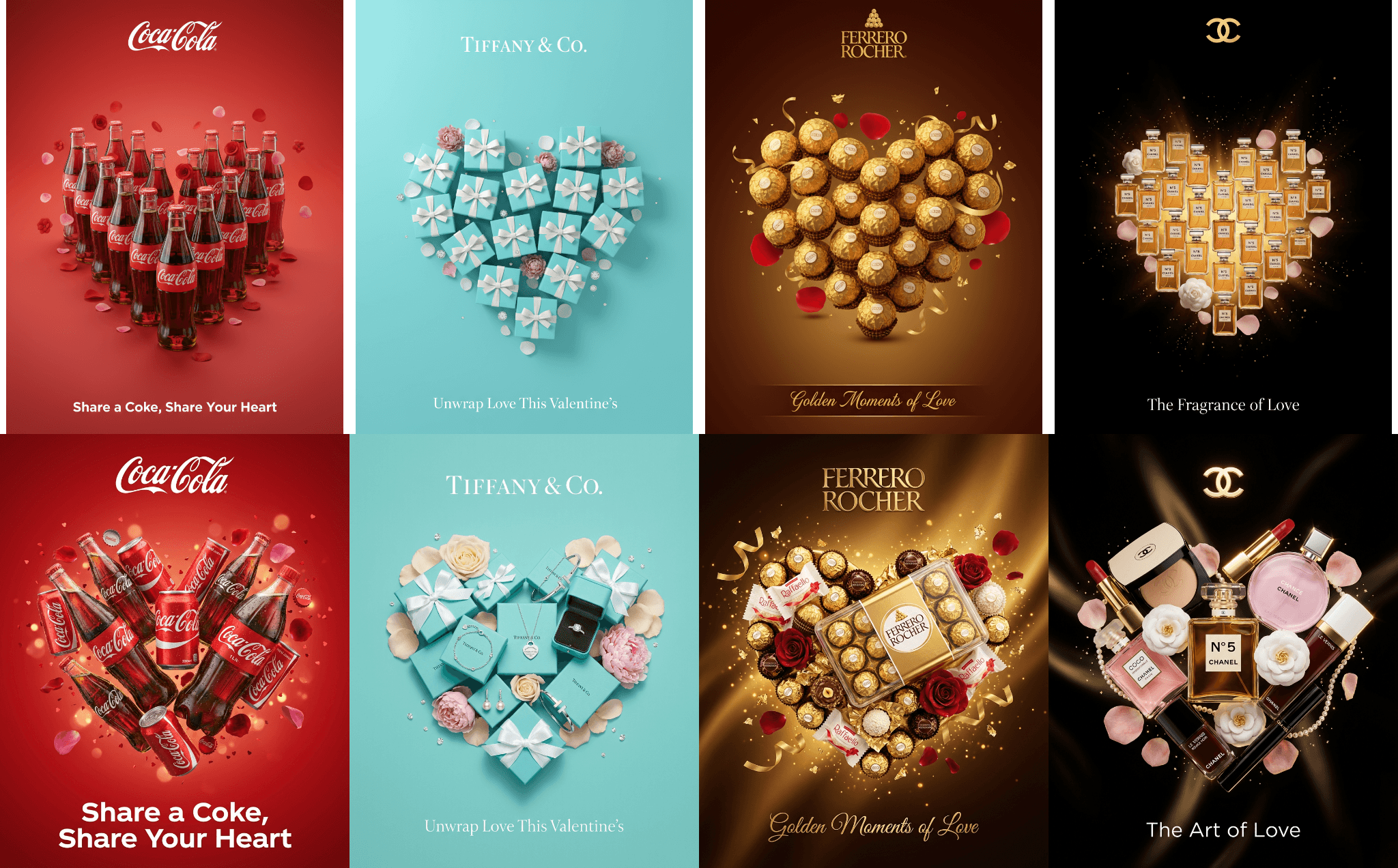
Coca-Cola — "Share a Coke, Share Your Heart"
The AI nailed the Coca-Cola red immediately. Glass bottles are arranged into a clean heart silhouette against a solid red background, with the tagline "Share a Coke, Share Your Heart" rendered in a script that echoes the brand's classic Spencerian lettering.
What works here is restraint. Coca-Cola's brand identity is so strong that the AI only needs two elements — the iconic bottle shape and the red — to make the ad instantly recognizable. The heart formation adds a Valentine's twist without diluting the brand signal.
Tiffany & Co. — "Unwrap Love This Valentine's"
Tiffany's robin's egg blue (Pantone 1837, if you are curious) is one of the most protected colors in luxury branding. The AI reproduced it faithfully, stacking signature gift boxes into a heart arrangement with white ribbon accents.
The result feels like something you might see in a Tiffany store window during February. The tagline "Unwrap Love This Valentine's" fits the brand's tradition of centering the gifting experience rather than the product itself.
Ferrero Rocher — "Golden Moments of Love"
The dark chocolate brown to gold gradient background is a textbook Ferrero Rocher move. The golden foil-wrapped spheres catch simulated light as they form the heart shape, creating a premium, indulgent feel that matches the brand's positioning as an affordable luxury.
This is an interesting test case because the product itself — a gold sphere — is geometrically simple, which makes the heart arrangement look natural and elegant rather than forced.
Chanel No.5 — "The Fragrance of Love"
Chanel's black-and-gold palette is preserved perfectly. The AI composed No.5 perfume bottles alongside camellia flowers — a signature Chanel motif — into a heart formation against an elegant black background.
The camellia detail is notable. It shows the AI drawing on broader brand knowledge, not just product appearance. The tagline "The Fragrance of Love" is simple and on-brand, avoiding the common AI tendency toward overwrought copy.
Model Comparison: Gemini 2.5 Flash vs. Gemini 3 Pro
After the first round, we re-generated the same four ads using Gemini 3 Pro, a more capable model. The goal: see how a higher-end model handles the same brief.
The difference was immediately visible. Here is the full side-by-side comparison:
What Changed with the Pro Model
Coca-Cola (Pro version):
The Pro version added product variety — cans, mini bottles, and bottle caps now appear alongside the classic glass bottles. Small details like condensation droplets on the glass add realism. The heart shape is denser and more layered.
Tiffany & Co. (Pro version):
Instead of boxes alone, the Pro output weaves in jewelry pieces — rings, necklaces, and bracelets peeking out from opened boxes. This adds storytelling: the gift has been opened, the moment of surprise is happening.
Ferrero Rocher (Pro version):
The Pro version expanded the product line to include Raffaello (white) and Rondnoir (dark), plus unwrapped pieces showing the wafer center. This creates visual variety within the heart shape and subtly cross-promotes the full product family.
Chanel (Pro version):
The biggest transformation. The Pro model expanded from perfume bottles alone to the full Chanel beauty range — lipstick, powder compact, nail polish, mascara — all maintaining the black-and-gold palette. This turns a fragrance ad into a beauty collection ad.
The takeaway: Flash gives you a solid first draft. Pro gives you a concept you could put in a client deck. Both preserve brand identity remarkably well — the difference is in richness and sophistication.
Prompt Engineering for Brand Advertisements
Getting results like these is not just about picking the right model. The prompt matters enormously. Here is the general structure that worked across all four brands:
A Valentine's Day advertisement for [BRAND NAME].
[BRAND COLOR] background.
[PRODUCT DESCRIPTION] arranged in a heart shape.
Tagline: "[TAGLINE TEXT]"
[STYLE DESCRIPTORS: lighting, mood, quality level]
Key Prompt Principles for Brand Ads
1. Lead with the brand's signature color. Do not assume the AI will choose the right background. Specify "Tiffany robin's egg blue" or "Coca-Cola red" explicitly. Brand colors are the fastest path to recognition.
2. Name specific products, not generic categories. "Ferrero Rocher golden foil-wrapped chocolate spheres" works better than "chocolates." The AI can render specific products with surprising accuracy when you give it enough detail.
3. Describe the arrangement, not just the elements. "Arranged in a heart shape" is the creative direction. Without it, products will scatter randomly.
4. Include a tagline in quotes. Putting the tagline in quotes helps the AI treat it as display text rather than a descriptive instruction. Keep taglines short — five to seven words maximum.
5. End with quality and style cues. Phrases like "studio lighting," "premium product photography," and "high-end advertising quality" push the output toward polished commercial aesthetics.
Practical Tips for Marketers
When AI-Generated Ads Make Sense
Early-stage concepting. Generate ten directions in the time it takes to brief one.
Social media content. Instagram stories, Pinterest pins, and social ads have a short shelf life.
Small business campaigns. If you cannot afford a product photographer, AI gets you 80% of the way there.
A/B testing variations. Generate multiple versions with different layouts or taglines to test.
Internal presentations. Pitch decks and mood boards benefit from polished visuals even at the concept stage.
Current Limitations
Text rendering. Taglines often come out distorted. Plan to add text in post-production.
Logo accuracy. Always replace AI-rendered logos with official brand assets.
Legal compliance. AI-generated images cannot guarantee adherence to brand guidelines or trademark rules.
Consistency across assets. Generating a cohesive campaign with uniform lighting and color temperature remains difficult.
Try It Yourself
Ready to try this workflow? Here is a step-by-step approach:
Choose your brand and occasion. Define the brand, the campaign moment, and the key visual concept.
Write the base prompt. Follow the structure above: brand + color + products + arrangement + tagline + quality cues.
Generate with a fast model first. Use a lighter model to iterate on composition and concept quickly.
Refine the prompt. Based on the first output, adjust product descriptions, colors, or arrangement.
Upgrade to a pro model. Once the concept is locked, re-generate with a more capable model.
Compare side by side. Use a canvas tool like VibeArt to place versions next to each other.
Post-process. Fix text, replace logos with official assets, and adjust colors to match brand guidelines.
Want to generate your own brand campaigns?Start creating on VibeArt — generate, compare, and refine AI product visuals on a single canvas.
You can also view the original Valentine's Day canvas: View on VibeArt
This article was produced using AI-generated imagery from VibeArt. All brand names and trademarks are the property of their respective owners and are used here for illustrative purposes only.