Compare AI Image Models Side by Side: Same Prompt, Real Results
Compare Gemini, Grok and Z-Image Turbo outputs from the same prompts. See real portrait and design examples, then run your own side-by-side model comparison.
February 14, 2026
•By VibeArt Team•
8 min read
•— views
Can I compare AI art models side by side?
Yes. In VibeArt's AI image model comparison tool, enter one prompt, select the available models you want to compare, and inspect their results together. Check the credit estimate before generating. You can continue working with the outputs in the canvas.
The examples below use the same prompt within each comparison. They show specific results from our February 2026 experiments with Gemini 2.5 Flash, Gemini 3 Pro, Grok Imagine and Z-Image Turbo. They are visual examples, not a current model leaderboard or a controlled speed benchmark. Availability and credit costs can change; check the tool before running your own comparison.
Choose the models and keep the aspect ratio the same. Review the displayed cost.
Compare prompt adherence, composition, faces, materials and unwanted artifacts.
Repeat promising candidates before choosing a model. One good output does not establish that a model is always better.
What to compare
What to look for in the results
Prompt adherence
Are the requested subject, objects and spatial relationships present?
Style and composition
Does the image suit the brief and leave the space you need?
Detail
Check faces, hands, fabric, reflections and any requested text at full size.
Iteration cost
Use the tool's current credit estimate, rather than historical prices.
Test 1: Photorealistic Portrait
For our first test, we chose a deliberately detailed prompt — a cozy, cinematic portrait scene with specific lighting, wardrobe, and mood requirements.
The prompt:
Photorealistic portrait of a teenage girl with long red hair in a high
messy bun, delicate natural freckles, sitting curled up in a huge cozy
teal bean bag chair beside a large window, winter daylight streaming in.
Reading a thick fantasy novel. Off-white fitted top, loose lavender
joggers, black ankle socks. Soft natural indoor lighting, subtle shadows,
detailed skin texture. Shot on Canon RF 50mm f/1.4, ultra-detailed,
cinematic framing, intimate cozy atmosphere.
The Results: Same Prompt, Four Models
Gemini 2.5 Flash
Gemini 3 Pro
Grok Imagine
Z-Image Turbo
Model
Style
Key Characteristics
Gemini 2.5 Flash
Natural, editorial
Warm tones, excellent skin texture, faithful to prompt details
Gemini 3 Pro
Polished, cinematic
Richer contrast, more dramatic lighting, slightly idealized
Grok Imagine
Bold, vivid
Saturated colors, strong composition, more stylized interpretation
Z-Image Turbo
Fast, clean
Simplified details, softer rendering, good for quick iterations
Gemini 2.5 Flash delivered arguably the most faithful interpretation. The freckles, the winter light, the cozy atmosphere — it all felt authentic. The image had an editorial photography quality, as if it were shot for a lifestyle magazine.
Gemini 3 Pro elevated the cinematic quality. The depth of field was more pronounced, the lighting more dramatic. It felt less like a candid photo and more like a carefully art-directed shot. If you're going for premium visual content, Pro adds that extra layer of polish.
Grok Imagine took a bolder approach. The colors were more saturated, the composition more dynamic. It interpreted the "cozy" mood differently — more vibrant than subtle. This model shines when you want eye-catching results that pop on social media.
Z-Image Turbo produced a cleaner, simpler image in this example, with fewer fine skin details and softer rendering. Compare it with the other three results to decide whether that level of detail suits your brief.
Verdict: Photorealistic Portraits
Best overall quality: Gemini 3 Pro
Best value: Gemini 2.5 Flash (high quality at moderate cost)
Most eye-catching: Grok Imagine
Fastest iteration: Z-Image Turbo
Test 2: Stylized Editorial Photography
For our second test, we explored a very specific aesthetic: Wes Anderson's signature visual style. We tested Gemini 2.5 Flash vs. Gemini 3 Pro across four different scenes — fashion, architecture, nature, and whimsy.
Fashion scene prompt:
Wes Anderson style editorial photograph. A woman in an oversized
powder-pink fur coat and dramatic pink wide-brim hat stands in a
pristine white snow landscape. Symmetrical composition, soft pastel
pink tones contrasted with deep royal blue accents. Cinematic lighting,
fairy-tale set design aesthetic, surreal whimsical mood.
Flash vs. Pro: Fashion Portrait
Both models captured the Wes Anderson DNA — the symmetry, the pastel palette, the fairy-tale quality. But the differences were telling:
Flash leaned into the whimsical, storybook quality with softer edges and a more dreamlike feel
Pro delivered a more grounded, editorial look — sharper details, more realistic fabric textures, and stronger color separation between the pink and blue accents
Architecture Scene
The architectural scene revealed an interesting pattern. Flash produced a more miniature, diorama-like quality — exactly what Wes Anderson films are known for. Pro made the palace feel more grand and monumental. Depending on whether you want whimsy or grandeur, either model could be the right choice.
Nature Scene
Verdict: Stylized Photography
For stylized, aesthetic-driven work:
Gemini Flash is better for whimsical, storybook, diorama-like aesthetics
Gemini Pro is better for editorial, fashion-forward, high-production-value looks
Both understand and execute complex style references like "Wes Anderson" extremely well
Test 3: Commercial Brand Design
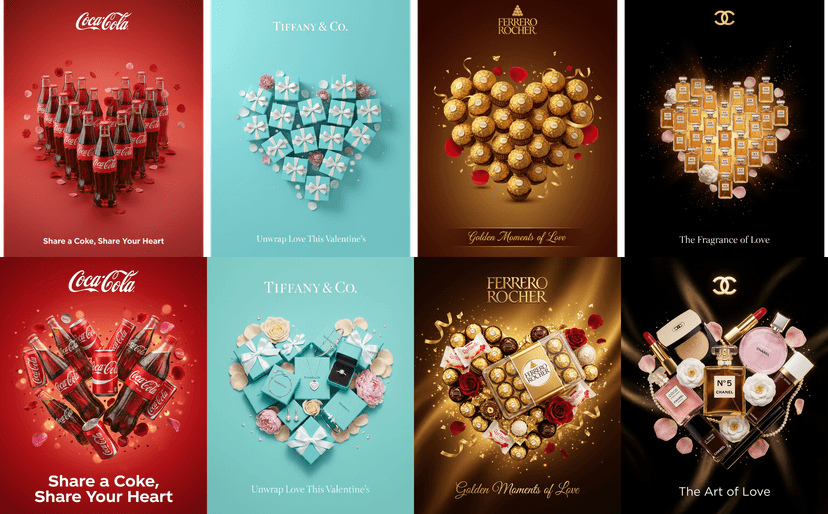
Our final test pushed into real-world commercial territory. We created Valentine's Day advertisements for four iconic brands: Coca-Cola, Tiffany & Co., Ferrero Rocher, and Chanel. Same detailed prompt structure, two models.
Coca-Cola prompt (abbreviated):
Professional Valentine's Day advertisement for Coca-Cola in 4:5 ratio.
Signature red (#D12020) backdrop. Arrange classic Coca-Cola glass bottles
to form a perfect heart shape. Romantic elements: rose petals, red
flowers. Tagline "Share a Coke, Share Your Heart". Photorealistic 3D
rendering, warm studio lighting, premium advertising quality.
Flash vs. Pro: Four Brands
The first row above shows the Gemini 2.5 Flash results. Clean, well-composed, and production-ready — but with a slightly simpler, more graphic-design feel.
Gemini 3 Pro took the same briefs and added an extra dimension of luxury. The Ferrero Rocher gold foil had more convincing metallic reflections. The Chanel bottles had more realistic glass refractions. The Tiffany blue felt more true to the brand's exact shade.
Verdict: Commercial Design
For commercial and brand work:
Gemini 3 Pro is worth the extra credits for luxury brands and premium advertising — the material rendering (glass, metal, fabric) is noticeably superior
Gemini 2.5 Flash is excellent for social media ads and quick campaign concepts where speed matters more than ultimate polish
Both models handle brand-specific color palettes and product composition remarkably well
Model choices to try for your own brief
These are starting points based on the examples in this article, not universal rankings:
Use Case
Recommended Model
Why
Photorealistic portraits
Gemini 3 Pro
Superior skin texture and lighting
Quick concept exploration
Z-Image Turbo
A simpler visual direction in this portrait example
Social media content
Grok Imagine
Bold, eye-catching output
Editorial photography
Gemini 2.5 Flash
Natural lighting in the portrait example
Brand advertising
Gemini 3 Pro
Premium material rendering
Whimsical/illustrated style
Gemini 2.5 Flash
Natural storybook quality
Rapid prototyping
Z-Image Turbo
Compare a simpler rendering with more detailed alternatives
Fashion photography
Gemini 3 Pro
Fabric texture, color precision
How to use these comparisons
Choose a model for the task in front of you. A style that works for a portrait may not work for a product photo. Keep the prompt fixed when comparing models; keep the model fixed when comparing prompt changes. Save the original outputs so you can check whether an edit actually improves the result.
Can I compare different prompts side by side too?
Yes. In the canvas, retain the original result and generate a variation with one instruction changed. Compare composition, lighting or style individually. Use the model comparison tool when the question is which model to use for one prompt.
Which AI image model is best?
These examples do not establish a single winner. Test your own brief using the models currently available, inspect several outputs, and weigh the results against the displayed credit cost.
Try It Yourself
Every image in this article was created on VibeArt's infinite canvas — where you can generate with multiple AI models side by side and compare results in real time. No switching between tools, no managing multiple subscriptions.